What is Loop Engineering?
If you have been vibe coding for a while, you know the drill. You write a prompt. The agent replies. You read it. You type the next thing. One turn at a time. You are holding the agent the whole time.
That worked fine when AI tools were new. But in 2026, the interesting work has moved. The hard part is no longer "how do I word this one prompt?" It is "how do I design a system that keeps working until the job is actually done?"
That is what Addy Osmani calls loop engineering. I came across a paper recently and it put words to something I was already feeling in my own vibe coding workflow.
Loop engineering is designing the control system that prompts, checks, routes, and stops an AI agent, instead of prompting it by hand one turn at a time.
What is a loop?
In this context, a loop is not a for loop in your code (though you might write one to run the agent).
It is a repeat cycle the agent follows until a goal is complete:
1 . Understand the goal
2 . Plan the next step
3 . Choose a tool or action
4 . Execute
5 . Observe the result
6 . Decide what to do next
7 . Repeat until done (or until a human needs to step in)
Sound familiar? If you have read about agentic AI, this is the same idea at the runtime level. Agentic AI is the concept. Loop engineering is how you actually build and tune it in your daily workflow.
Loop engineering vs prompt engineering vs context engineering
These terms get mixed up a lot. Here is how I think about them:
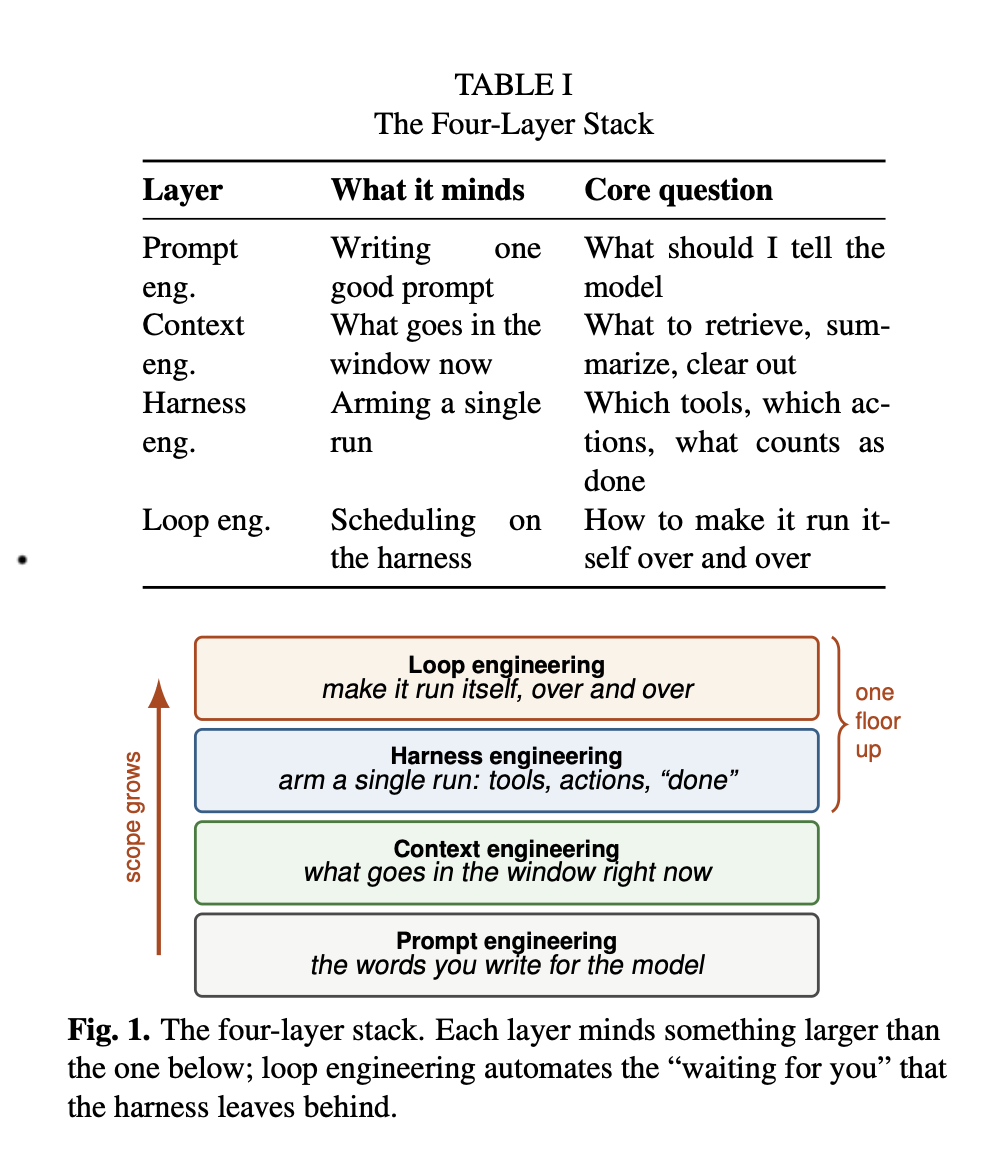
Prompt engineering : making one instruction better. Eg, "refactor this component and explain why."
Context engineering : shaping what goes into the window around that instruction. Eg, which files, docs, or rules the agent can see before it starts.
Harness engineering : building the environment a single agent run lives inside. Eg, permissions, tools, MCP servers, project setup.
Loop engineering : wrapping all of that in an autonomous control structure. Something decides what to prompt next, whether the output is good enough, and when to stop.
Prompt engineering improves a single turn. Loop engineering improves the whole run.
You still need good prompts and good context. But the leverage point has moved up a level.
What does a loop need?
A useful loop usually has five building blocks. You do not need all five on day one, but production loops tend to grow into them.
1. A clear goal and a definition of "done"
Vague goals produce vague loops. "Make the app better" is not a goal the agent can finish.
Better: "Fix all failing unit tests in src/auth/ and show me the diff."
Even better if "done" is checkable: tests pass, linter is clean, or a reviewer agent says the spec is met.
2. Tools and connectors
A loop that can only read files is a small loop. Give the agent real actions: run tests, call an API, query docs, open a PR, update a ticket.
This is where MCP and skills start to matter. MCP connects the agent to data and services. Skills give it repeatable instructions for a type of task. Automations fire those on a schedule or trigger.
Eg, I built an accessibility skill that audits and fixes a11y issues. In a loop, that skill becomes one step: audit, prioritise, fix, verify. The loop decides when to run it, not you pasting the same prompt every time.
3. Verification (do not let the agent grade its own homework)
The model that wrote the code is often too generous reviewing it. A strong loop separates roles:
1 . One agent explores or implements
2 . Another verifies against the spec, tests, or lint rules
3 . A fresh check decides if the loop should stop
Binary checks beat vibes. Tests passing, build green, typecheck clean: those are good stop signals. Asking the same model "does this look good?" is not.
4. Stop rules and guardrails
A loop without stop rules either quits too early or never stops.
Useful guardrails:
- Budget limits (time, tokens, cost)
- Max iterations
- Human approval before irreversible actions (merge, deploy, send email)
- Scoped permissions (read-only vs draft vs execute)
A safe loop knows when to stop, when to ask you, and when to keep going.
5. Automations so it runs without you
A one-off agent run is not loop engineering yet. The loop part is when the system runs again on its own.
Eg in tools today:
- Claude Code: hooks at lifecycle points, scheduled tasks,
/loop-style recurring prompts - Codex: automations with a cadence, triage inbox for runs that found work
- CI/GitHub Actions: agent steps that keep running after you close the laptop
The automation picks the project, the prompt or skill, how often it runs, and what happens with the output.
A simple mental model
Think of yourself moving from operator to designer:
| You as operator | You as loop engineer |
|---|---|
| Type each prompt | Define the goal and stop condition |
| Read every reply | Set up verification |
| Copy-paste context | Wire tools, MCP, skills once |
| Stop when you get tired | Set budgets and guardrails |
| Run it again tomorrow manually | Schedule or trigger the loop |
You are not replacing yourself. You are replacing yourself as the person who sits there for every single turn.
When does loop engineering make sense?
Use it when the work is:
1 . Multi-step (research, implement, test, fix)
2 . Repetitive (daily triage, dependency updates, audit passes)
3 . Tool-heavy (needs tests, APIs, docs, tickets)
4 . Hard to finish in one prompt
Skip it when a single good prompt is enough. Not everything needs a loop. Adding automation to a one-line fix is overkill.
Eg, good fit: "Every morning, scan open PRs for accessibility regressions and open a summary." Bad fit: "Rename this one variable."
How this connects to agentic AI
Agentic AI is the bigger picture: agents with tools, memory, permissions, and an execution loop working toward a goal.
Loop engineering is the practical discipline of building that loop well:
- What triggers the next turn?
- What evidence is required before continuing?
- Which tools are in reach?
- What counts as done?
- Who approves risky actions?
If agentic AI is the architecture diagram, loop engineering is the part you tune until it works in production without you babysitting every step.
Where to start
You do not need a fancy orchestrator on day one. Start small:
1 . Pick one recurring task you already do with AI (code review, test fixes, doc updates)
2 . Write down what "done" means in checkable terms
3 . Add one verification step the agent cannot skip (tests, lint, or a second review pass)
4 . Save the instructions as a skill so you are not re-prompting from scratch
5 . Only then add scheduling or automation
I am still learning this myself. The tools are moving fast (Claude Code, Codex, Cursor, OpenClaw, and more). But the pattern is stable: design the loop, not just the prompt.
If you want to go deeper, I recently read this 11-page IEEE paper on loop engineering. Worth a skim.
Happy learning!!