I Built a Accessibility Skill to Audit and Fix Accessibility
I have written a lot about accessibility. I talk about it at conferences. I've written posts about why developers don't focus on it, automated tools and their limits, and why you should never disable outline.
And then I ran my own skill on my own blog.
15 issues. On my own site. The one I built while writing accessibility content.
That was humbling.
What is a Skill?
AI coding tools — Claude Code, Cursor, and Kiro — all support a way to give your AI assistant domain-specific instructions through files in your repository. The exact name varies by tool (Claude Code calls them skills, Cursor uses rules, Kiro uses specs) but the idea is the same: a markdown file that tells the AI how to approach a specific category of task.
Drop the file in the right directory, invoke it, and the AI follows a structured expert workflow instead of making it up from scratch.
Think of it like a custom instruction set for a specific job. Mine is for accessibility.
Skills, rules, and specs all live in your repo and travel with your code. Any engineer on your team gets the same audit workflow, regardless of which AI tool they use.
Announcing: check-fix-accessibility
GitHub: Neha/check-fix-accessibility
The skill covers:
- Web frameworks: Next.js, React, Vue, Angular, plain HTML/CSS/JS
- Standard: WCAG 2.2 Level A and AA by default
- Scope: Semantics, focus and keyboard, forms, ARIA, images, colour contrast, motion, screen readers, voice control, SPA/dynamic content
The workflow it follows is always the same:
1 . Audit — reads your components, pages, and CSS; runs static analysis
2 . Prioritise — labels every issue as Critical, Serious, or Minor
3 . Fix — applies fixes following WCAG patterns
4 . Verify — confirms keyboard flow and screen reader behaviour
Watching it run on this blog
I ran it on this site using Claude Code. Here is what the output looks like:
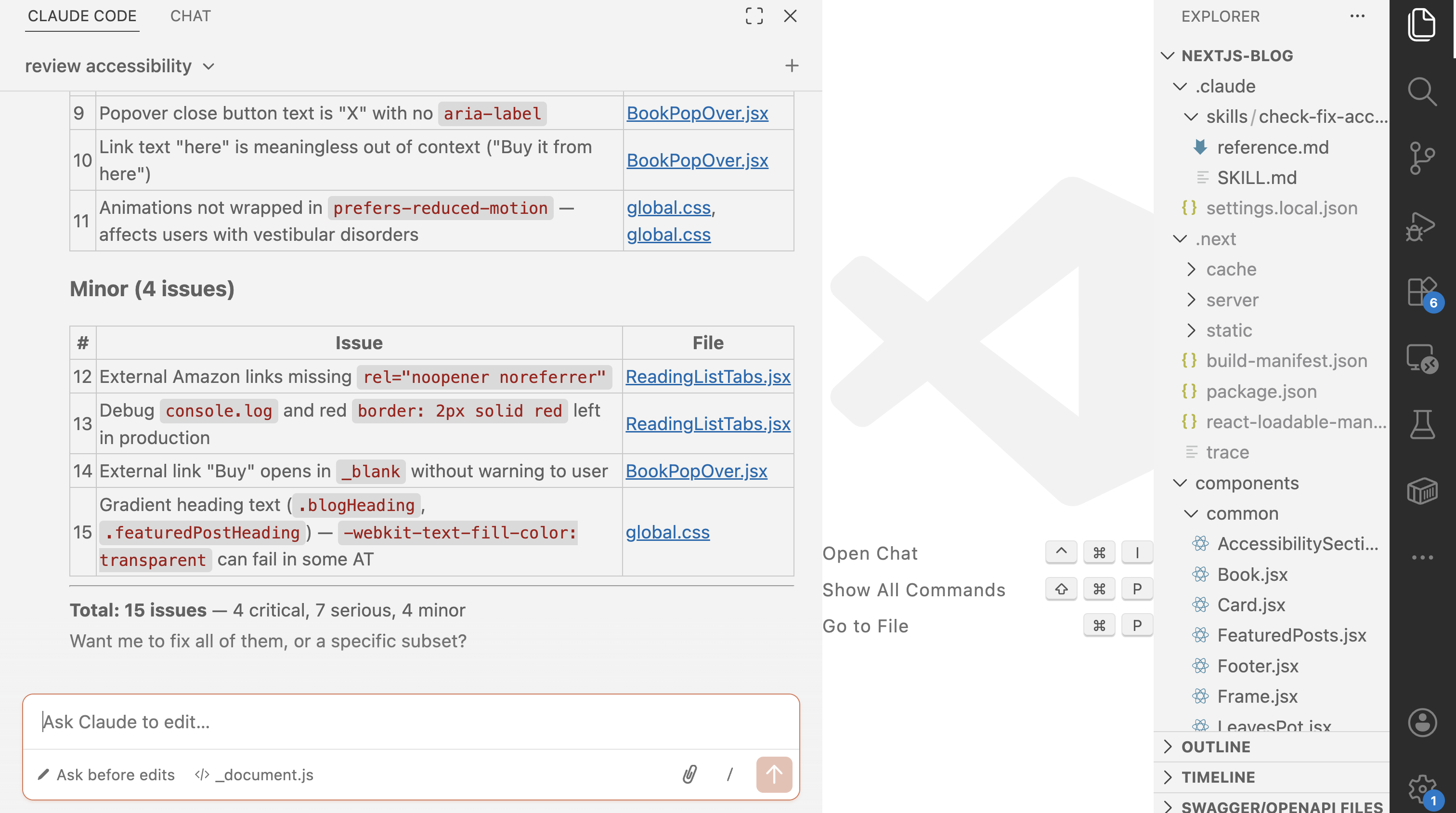
It reads every layout file, every component, and every CSS file. Then it produces a structured report.
What it found on nehasharma.dev
This is the actual audit summary Claude Code produced after running the skill on this site:
Critical (4 issues — blocks access entirely)
| # | Issue | Location |
|---|---|---|
| 1 | No lang attribute on <html> — screen readers can't detect language |
Missing _document.js |
| 2 | No skip-to-main-content link — keyboard users tab through the full nav on every page | layout.js |
| 3 | <button> nested inside <a> — invalid HTML, breaks keyboard and AT navigation |
ReadingListTabs.jsx |
| 4 | Tab widget missing all ARIA — no role="tablist/tab/tabpanel", no aria-selected, no arrow key support |
ReadingListTabs.jsx |
Serious (7 issues — major barrier)
| # | Issue | Location |
|---|---|---|
| 5 | No :focus-visible styles anywhere — focused elements are invisible to keyboard users |
global.css |
| 6 | focus:outline-none on hamburger button — removes focus ring entirely |
Navigtation.jsx:41 |
| 7 | Mobile menu has no Escape key handler | Navigtation.jsx |
| 8 | Book buttons have no aria-label — announced as "button" with no context |
Book.jsx |
| 9 | Popover close button text is "X" with no aria-label |
BookPopOver.jsx:88 |
| 10 | Link text "here" is meaningless out of context ("Buy it from here") | BookPopOver.jsx:153 |
| 11 | Animations not wrapped in prefers-reduced-motion — affects users with vestibular disorders |
global.css |
Minor (4 issues — improves experience)
| # | Issue | Location |
|---|---|---|
| 12 | External Amazon links missing rel="noopener noreferrer" |
ReadingListTabs.jsx |
| 13 | Debug console.log and border: 2px solid red left in production |
ReadingListTabs.jsx:6,20 |
| 14 | External "Buy" link opens in _blank without warning |
BookPopOver.jsx:154 |
| 15 | Gradient heading text (-webkit-text-fill-color: transparent) can fail in some AT |
global.css:253 |
Total: 15 issues — 4 critical, 7 serious, 4 minor.
Issue #13 stung the most. A debug red border. In production. On my accessibility blog. 🙃
What makes this useful
Accessibility audits usually fall into one of two traps:
Too shallow — automated tools like Lighthouse catch maybe 30–40% of issues. Missing alt tags, yes. Invalid <button> inside <a>, no.
Too slow — manual audits with NVDA or VoiceOver are thorough but take time most teams don't have.
This skill sits in between. It reads your actual source code — not just the rendered DOM — so it catches structural and semantic issues that automated tools miss. It also knows the difference between a decorative image and a meaningful one, and understands when aria-hidden is correct vs harmful.
It's not a replacement for screen reader testing. It's what you do before screen reader testing so you're not fixing the obvious stuff during the manual pass.
How to use it
Step 1 — Download the skill file
curl -o SKILL.md \
  https://raw.githubusercontent.com/Neha/check-fix-accessibility/main/review-fix-a11y/SKILL.md
Step 2 — Put it in the right place for your tool
| Tool | Directory | File name |
|---|---|---|
| Claude Code | .claude/skills/ |
check-fix-accessibility.md |
| Cursor | .cursor/rules/ |
check-fix-accessibility.mdc |
| Kiro | .kiro/specs/ |
check-fix-accessibility.md |
Step 3 — Invoke it
In Claude Code:
/check-fix-accessibility
In Cursor or Kiro, just ask in natural language:
review accessibility
That's it. It will explore your project, run the audit, and give you a prioritised list with file names, line numbers, and fixes.
What's next
The skill today covers static analysis of source code. I want to add:
- Live URL scanning with axe-core
- Colour contrast checking against actual computed styles
- A fix mode that applies patches automatically
If you try it and find something it misses — or something it gets wrong — open an issue. The skill improves every time someone runs it on a codebase it hasn't seen before.
Happy Building.