Token optimisation in Agentic AI
You built a support agent that cost you about $8,000 a month to run. It worked, but every ticket fired off six or seven LLM calls, and each call carried the entire conversation, all the tool schemas, and whatever raw JSON the last tool spat out.
Once you actually measured where the tokens went, you can cut that bill by roughly 80% and shaved seconds off every response without the agent getting any dumber.
This blog is about how. But before the techniques, the single most important thing:
Measure first
Every optimization below trades something away. If you can’t see where your tokens actually go, you’ll spend a day shaving a step that runs once and ignore the tool output that gets resent fifty times. Instrument, then cut.
If you only take two things from this blog: turn on prompt caching and filter your tool outputs. They’re the highest leverage, the lowest risk, and you can ship both in an afternoon. Everything else is refinement on top.
First, measure: where do the tokens go?
You can’t optimize what you can’t see. Before touching anything, log per-call token usage and tag it by what’s in the payload. Most SDKs return usage on every response:
python
resp = client.messages.create(…)
log.info({
"step": step_id,
"input_tokens": resp.usage.input_tokens,
"cache_read_tokens": resp.usage.cache_read_input_tokens,
"output_tokens": resp.usage.output_tokens,
"model": model_id,
})
For anything beyond a toy, use a tracing tool LangSmith, Langfuse, or plain OpenTelemetry so you get per-step token counts across a whole run, not just one call.
Look for four things:
- Which step has the largest input? A raw tool response is often the culprit.
- What stays identical across calls? System instructions and tool schemas are good caching candidates.
- How many calls are retries or error loops?
- How much of the bill comes from reasoning tokens rather than the visible answer?
Once you have that breakdown, you can see where the burn is happening and now you can cut it.
Why agents burn tokens
An agent loop has a habit of paying for the same context again and again:
- The system prompt and tool schemas are sent with every call
- The conversation grows on every turn.
- Raw tool responses stay in context long after they are useful.
- Reasoning tokens can dwarf a short final answer.
- Failed tool calls trigger expensive retries.
Consider a six-step support run with a 5,000-token stable prefix, history growing by about 600 tokens per turn, and three bulky tool responses:
By step 6, the agent has reread the orders response four times. That repeated reading is what we want to remove.
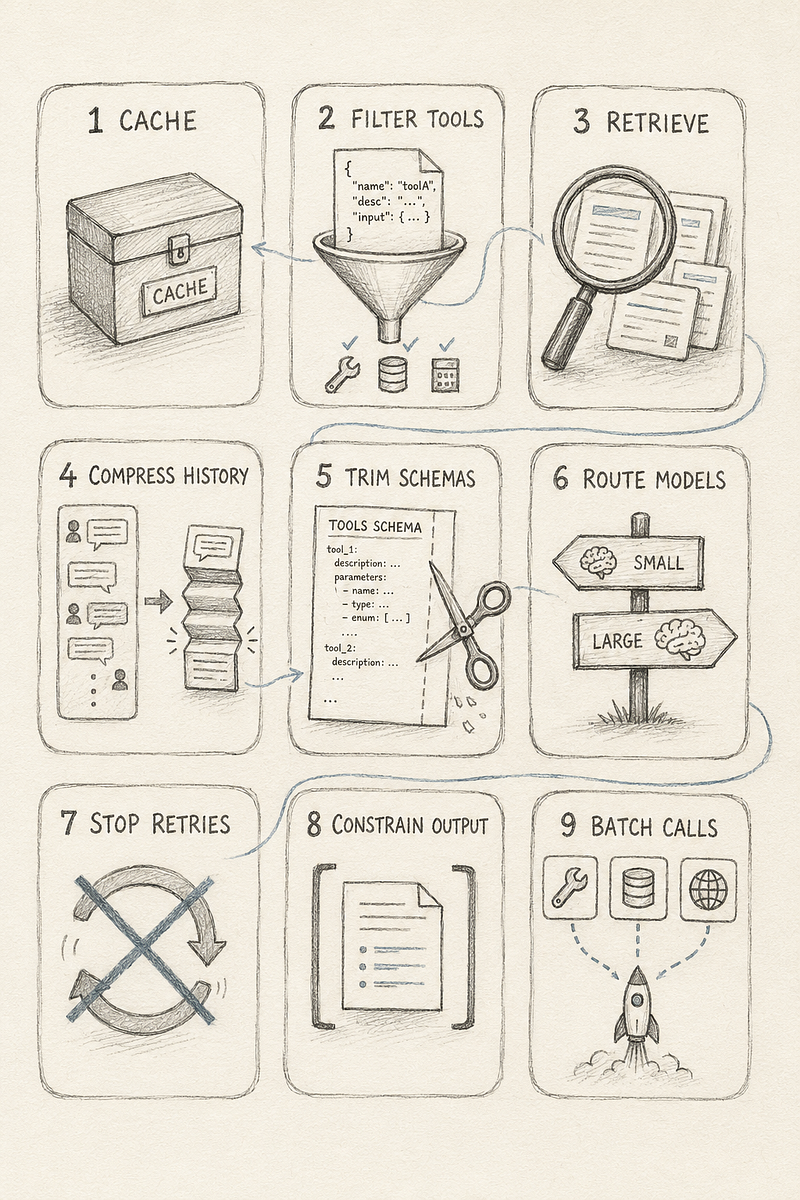
Ways to optimize tokens
1. Cache what doesn’t change
Provider prompt caching lets repeated prompt prefixes be reused rather than fully processed on every call. It is not the model’s internal KV cache; it is an API feature with provider-specific behavior and pricing.
The practical rule is simple: put stable content, tool definitions and system instructions, at the front, and volatile content such as conversation history at the end. Keep the stable prefix byte-identical when you can.
For providers that expose cache controls, place the cache boundary after the stable prefix. For providers with automatic caching, structure still matters because prefix changes can prevent a hit.
Do not assume the cache is helping. Check your production logs for non-zero cache reads, and account for cache lifetime, minimum prompt sizes, and any write premium in your provider’s current pricing.
# Anthropic: cache breakpoint on the last stable block (after tools + system)
resp = client.messages.create(
model=model_id,
tools=TOOLS, # cached as its own prefix segment
system=[
{"type": "text", "text": SYSTEM_PROMPT,
"cache_control": {"type": "ephemeral"}}, # breakpoint here
],
messages=history, # volatile - keep after the breakpoint
)
The real math, and it is provider-specific don’t assume one model of pricing:
- Anthropic: cache reads ~10% of base input, but cache writes cost ~25% more than base. So the first call is pricier, not free you only come out ahead once enough reads amortize the write. Ephemeral TTL is ~5 minutes (a longer TTL is available at higher cost).
- OpenAI: caching is automatic on long prompts, no write premium, reads ~50% off. Cache lifetime is managed for you (minutes up to ~an hour), not user-controlled.
- Gemini: offers both implicit and explicit caching with its own pricing and minimum-token thresholds.
The takeaways that survive across all of them: caches expire, so a slow or low-traffic agent can miss the window and pay full price caching is a big win for busy agents and can be a net loss for a quiet one. And whatever provider you’re on, verify with your logs that cache_read_tokens is actually non-zero in production. If it isn’t, your cache is cold and you’re fooling yourself.
Rule of thumb: put the stable prefix (tools + prompt) at the front, keep volatile content (current history) at the end.
2. Filter tool responses before they enter context
A tool may return everything the application needs, but the model rarely needs all of it.
//before

result = api.get_orders(customer_id) # 50KB of JSON
context.append(result)

// After - filter to what the agent actually needs to reason:

result = api.get_orders(customer_id)
trimmed = [
{"id": o["id"], "total": o["total"], "status": o["status"]}
for o in result["orders"][:10]
]
context.append(trimmed)
For very large results, store the full response outside the prompt and give the agent a reference it can fetch when needed.
Be careful here. An aggressive filter can silently remove a field required for a later decision. Test filters against real tasks, not just a happy-path demo.
3. Retrieve context instead of stuffing it
If the agent works with documentation, knowledge bases, or long customer records, do not paste everything into the prompt. Retrieve the relevant pieces for the current step.
chunks = vector_store.search(query, top_k=5)
context.append("\n".join(c.text for c in chunks))
Retrieval replaces a token problem with a recall problem. Set top_k too low, or use weak retrieval, and the agent may miss the one passage it needed. Tune retrieval against an evaluation set and track hit rate.
Smaller, relevant context can also improve accuracy. A model may technically accept a long prompt while paying too little attention to information buried in its middle.
4. Compress conversation history
The agent usually does not need the full transcript forever. Three approaches work well:
- Sliding window: keep the latest turns and discard older ones. It is cheap and simple, but loses long-range details.
- Summarization: replace older turns with a compact summary after the history crosses a token threshold.
- Structured state: maintain a short task record instead of relying on the transcript as memory.
Task: Migrate database to PostgreSQL
Done: Schema converted; 3 of 5 tables migrated
Next: Migrate orders and users
Blocker: Foreign-key constraint on orders.user_id
Summarization is not free: the summarizer must read the old history. It only pays off when the summary is reused enough times. Trigger it by token count rather than turn count, use a cheaper model when appropriate, and cache per-message token counts so you do not repeatedly tokenize the full transcript.
5. Trim tool schemas and load only relevant tools
Tool definitions are part of the prompt, so verbose descriptions become expensive when they are sent repeatedly.
// Before: ~90 tokens
{ "name": "search_customer_database",
"description": "This tool allows you to search through the entire customer database using a variety of different search parameters and filters in order to find records matching your criteria.",
"parameters": { "query": { "type": "string", "description": "The search query string you would like to use" } } }
// After: ~30 tokens
{ "name": "search_customers",
"description": "Search customer records by query.",
"parameters": { "query": { "type": "string", "description": "Search string" } } }
Shorten descriptions without making them ambiguous. More importantly, load only the tools relevant to the task. A billing request probably does not need all 50 tools in the workspace. A smaller tool set also reduces the chance of choosing the wrong one.
6. Route each step to the right model
Not every step needs the most capable model. Classification, extraction, summarization, and simple tool selection can often run on a smaller model. Save the stronger model for work that requires it.
if task_complexity(step) == "simple":
response = cheap_model.call(messages)
else:
response = strong_model.call(messages)
The trap is building an expensive router. If another LLM call decides which model to use, the extra cost and latency may erase the saving. Start with simple signals such as task type, payload size, or workflow depth.
7. Stop retry loops and right-size reasoning
Retries are easy to miss because each individual call looks legitimate in a trace. An agent that receives a vague tool error may repeat the same invalid call three times.
Return specific, actionable errors and cap retries. “Invalid request” is not useful; “customer_id is required and must be a UUID” gives the model something it can correct.
Apply the same discipline to reasoning. A trivial routing decision does not need the same reasoning budget as a difficult diagnosis
8. Constrain the output
If the next component expects JSON, use structured output or constrained decoding instead of asking for JSON in prose and hoping it parses. You will usually get fewer output tokens and avoid repair calls caused by malformed responses.
Set output limits deliberately as well. A classification step may need ten tokens, not two thousand. Give each step enough room to finish, but not an open invitation to ramble.
9. Batch independent tool calls
If three tool calls do not depend on one another, request them in parallel within one model turn. This reduces the number of times the prompt prefix is sent and removes sequential round-trips.
This optimization helps latency as much as cost. Check that your agent framework supports parallel tool use and is not quietly serializing the calls
What this looks like end to end
Returning to the six-step support example, suppose we load four relevant tools instead of twelve, cache the stable prefix, reduce the three raw tool responses by about 90%, and send two mechanical steps to a cheaper model.
These are modeled figures, not a benchmark:
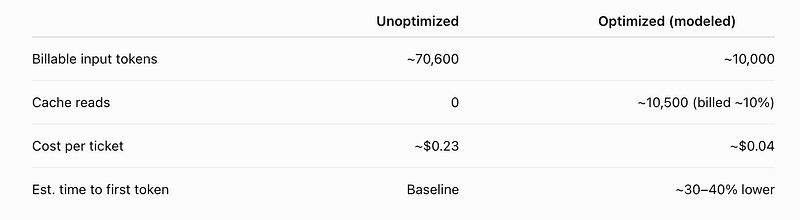
The exact numbers will depend on the model, provider pricing, cache-hit rate, traffic pattern, and tool payloads. The point is the shape of the result: filtering and caching did most of the work. Tool trimming and model routing were smaller improvements.
One latency caveat matters. Cutting input tokens mostly improves time to first token, the phase when the model processes the prompt. It does less for a long, output-heavy response. Parallel tool calls are what reduce total wall-clock time by removing complete round-trips.
So I would not promise “a 40% faster agent.” I would promise a faster first response and fewer sequential waits, then measure both.
Prove you didn’t break it
An 80% saving is meaningless if the agent gives worse answers.
Keep a small evaluation set of real tasks with known-good outcomes. Run it before and after every optimization and compare task success, not vibes
Baseline eval: 47/50 tasks pass
After output filter: 47/50 pass ✓ ship it
After summarization: 41/50 pass ✗ too aggressive, back off the threshold
If quality drops, you cut too far. Back off. That feedback loop is what separates genuine optimization from an agent that is cheaper because it quietly fails more often.
Summary
- Measure first. Log token usage at every step and trace the full workflow. Without a baseline, you are only guessing.
- Cache the stable prefix. Cache system instructions and tool definitions, then verify that cache reads are actually happening.
- Filter tool responses. Keep only the fields the model needs. Store large payloads elsewhere and pass a reference.
- Retrieve selectively. Bring relevant context into the prompt instead of loading everything.
- Compress long histories carefully. Include the summarizer’s own cost when calculating whether compression is worthwhile.
- Tackle the smaller savings. Trim tool schemas, route simple work to cheaper models, limit retries and outputs, and run independent tool calls in parallel.
- Test before and after. Use an evaluation set to confirm that lower cost has not come at the expense of quality.
Start with prompt caching and tool-output filtering, they usually deliver the biggest gains with the least disruption. Measure the result, then decide whether the remaining optimizations justify the engineering effort. For a low-volume agent, they may not.
Thank you for reading this. If you like this, then please share in your network . Give a clap, leave a comment.
You can contact me at X or LinkedIn
Happy Learning!!