AWS Byte #1: Hosting Your Static Website on AWS
This is part of the AWS Architecture Bytes series.
Problem
You have a static website and you need to host it on AWS. It should be fast, secure, can handle failover and accessible via a custom domain.
Your turn
Before reading the solution — try to think about:
- Which services would you use and how do they connect?
- How would you handle HTTPS and custom domains?
- How would you handle failover?
- How would you automate deployments across environments?
Solution
Pre-requisites
| What | Why |
|---|---|
| AWS Account | An active account with billing enabled (root or IAM user) |
| Domain name | A registered domain with access to DNS settings (cPanel, Route 53, or any registrar) |
| Static website code | HTML, CSS, JS files ready to deploy (or a build tool like npm run build) |
| GitHub | Code hosted on GitHub with repo access for CodePipeline integration |
| AWS CLI | For manual deploys, S3 sync, and CloudFront cache invalidation from your terminal |
Services
| Service | Why |
|---|---|
| S3 | Store and serve static files (HTML, CSS, JS) |
| CloudFront | CDN for global delivery, caching, and HTTPS termination |
| ACM (Certificate Manager) | Free SSL/TLS certificate for your custom domain |
| Route 53 | DNS management, point your domain to CloudFront |
| IAM | Policies for S3 access, replication roles, CI/CD permissions |
| CodePipeline | Automate build and deploy on every push |
| CloudWatch | Monitoring, alarms, and logging |
| SNS | Send alarm notifications (email, SMS, Slack via Lambda) |
HLD
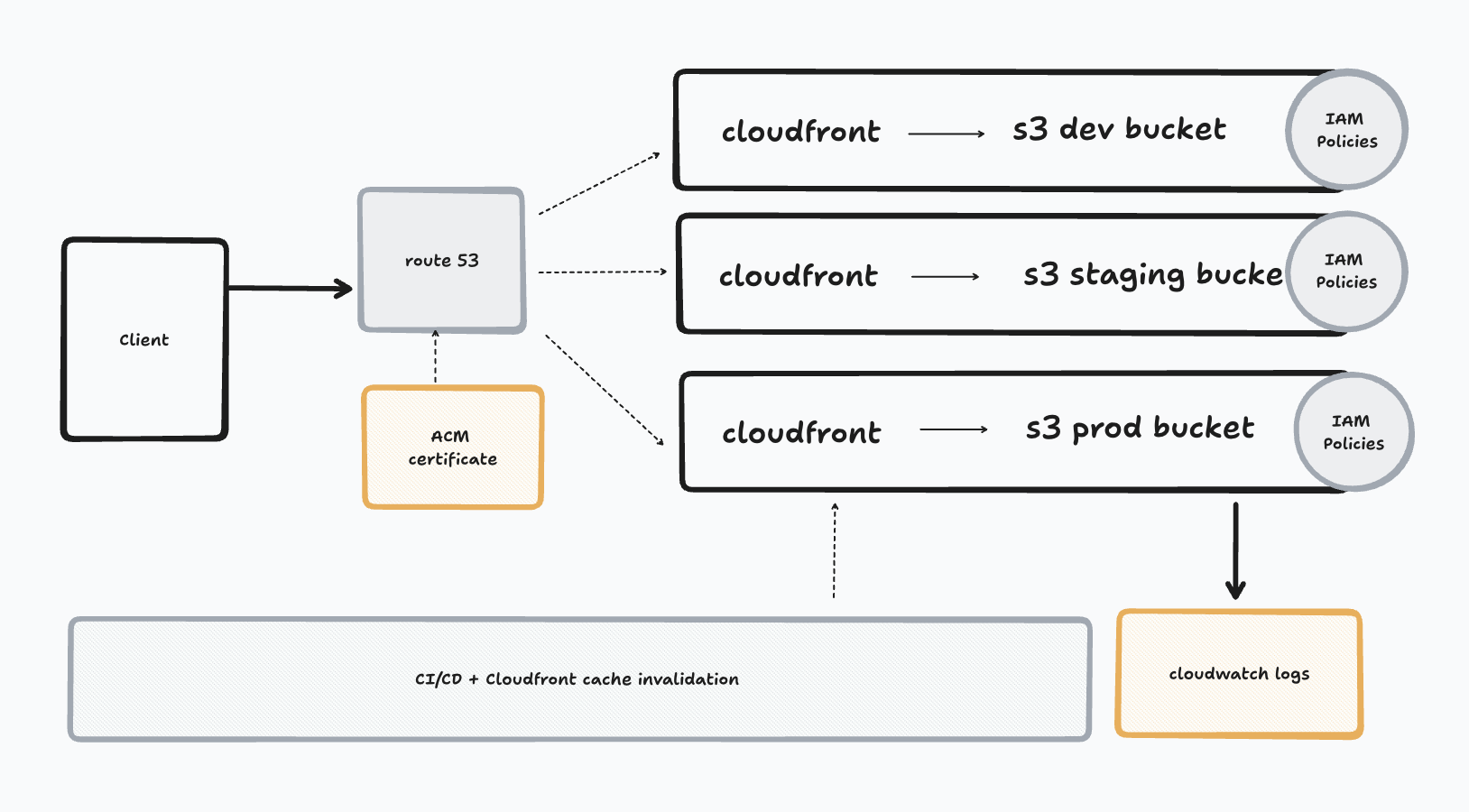
Steps
Step 1: Create S3 buckets for all the environments
- Choose a region closest to your primary users (e.g.,
eu-west-2for UK). The prod bucket region will be the replication source. - Create one bucket per environment:
dev-<MYSITE>,staging-<MYSITE>,prod-<MYSITE>; PS: replace MYSITE with your site name. - Do not enable static website hosting — we're using CloudFront with OAC (origin access control) which uses the S3 REST endpoint instead. If you are not using CloudFront then you can enable static website hosting and allow public access to buckets.
- Enable versioning on the prod bucket (required for replication later)
- Block all public access on all buckets (CloudFront will access them, not users directly)
Step 2: Set up CloudFront
- Create a separate distribution per environment — each pointing to its own S3 bucket
- Add the alternate domain name (CNAME) on each distribution (e.g.,
dev.example.com,staging.example.com,example.com) — without this, CloudFront won't serve traffic for your custom domain - Use Origin Access Control (OAC) on each so only CloudFront can read from S3. When you create OAC, CloudFront will generate a bucket policy (allows
s3:GetObject) — copy it and add it to your S3 bucket's permissions - Set default root object to
index.html - Configure custom error pages — for SPAs (React Router, etc.) redirect 404 →
index.html. For plain HTML sites, use a real 404 page instead - Enable Compress Objects Automatically for better performance (gzip/brotli)
- Set cache policy — use
CachingOptimizedmanaged policy for static sites (default TTL 24 hours) - Choose Price Class 100 (US, Canada, Europe) to save costs, or Price Class All if you need global coverage
Step 3: Request SSL certificate (ACM)
- Request a wildcard certificate (
*.example.com) in us-east-1 (required for CloudFront) — this coversdev.example.com,staging.example.com, andexample.com - Alternatively, request separate certs per environment
- Validate via DNS (add the CNAME record in Route 53)
- Attach the certificate to all three CloudFront distributions
Step 4: Configure Route 53
- Create a hosted zone for your domain
- Add A records (alias) for each environment pointing to its CloudFront distribution:
example.com→ prod CloudFrontdev.example.com→ dev CloudFrontstaging.example.com→ staging CloudFront
- Optionally add a
wwwCNAME for prod
Step 5: Set up cross-region replication
-
This is typically only enabled for production because:
- It doubles your storage costs (data is copied to another region)
- It's primarily for disaster recovery and low-latency access for geographically distributed users
- Dev/staging environments rarely need that level of redundancy
-
Create a secondary S3 bucket in another region
-
Enable versioning on both buckets
-
Create an IAM replication role with
s3:ReplicateObjectpermission from source to destination bucket -
Add a replication rule on the primary bucket
-
Configure CloudFront origin group with primary + replica as failover
Step 6: Set up CI/CD with CodePipeline
- Create an IAM role for each pipeline with
s3:PutObject,s3:DeleteObject, andcloudfront:CreateInvalidationpermissions - Source: connect to your GitHub repo
- Build: use CodeBuild to run your build command (e.g.,
npm run build) - Deploy: sync build output to S3 and invalidate CloudFront cache
Step 7: Set up monitoring (CloudWatch)
- Enable CloudFront access logs to S3 for each distribution
- Create an SNS topic (e.g.,
prod-website-alerts) and subscribe your email (or SMS/Slack via Lambda) - Set up CloudWatch alarms for 5xx error rates — prod alarms should be stricter (e.g., trigger on 1% errors) vs dev/staging (more relaxed or no alarms)
- Point each alarm's action to the SNS topic so you get notified when something breaks
- Monitor cache hit ratio per distribution
- Set up a CloudWatch dashboard grouping all three environments for a single-pane view
Multi env setup
Each environment gets its own stack:
| Dev | Staging | Prod | |
|---|---|---|---|
| S3 bucket | s3://dev-mysite |
s3://staging-mysite |
s3://prod-mysite |
| CloudFront | separate distribution | separate distribution | separate distribution |
| Domain | dev.example.com |
staging.example.com |
example.com |
| ACM cert | wildcard *.example.com or separate |
wildcard *.example.com or separate |
example.com |
| Route 53 | A record → dev CF | A record → staging CF | A record → prod CF |
| IAM role | dev-deploy-role | staging-deploy-role | prod-deploy-role |
| Pipeline trigger | push to dev branch |
push to staging branch |
push to main branch |
- Use a wildcard ACM certificate (
*.example.com) to avoid managing separate certs per environment - Each environment has its own IAM role — dev pipeline should never have access to prod bucket
- Cross-region replication is only needed for prod — dev and staging don't need failover
- Keep environment-specific configs (API URLs, feature flags) in build-time environment variables via CodeBuild
Bonus: Deploy via CLI
You don't always need a pipeline — sometimes you want to push code manually from your terminal.
# Sync build folder to S3 (--delete removes old files)
aws s3 sync ./build s3://prod-mysite --delete

# Invalidate CloudFront cache so users see the latest version
aws cloudfront create-invalidation --distribution-id YOUR_DIST_ID --paths "/*"
Gotchas
- ACM certificate must be in
us-east-1for CloudFront — even if your S3 bucket is in another region - CloudFront cache won't update automatically after S3 changes — you need to create an invalidation or use versioned filenames
- S3 replication only copies new objects — existing objects won't be replicated retroactively
- Don't enable S3 static website hosting endpoint with CloudFront — use the S3 REST endpoint with OAC instead
- CloudFront propagation after changes can be slow — don't panic if DNS changes don't reflect immediately