AI Glossary I Wish I Had When I Started
AI Glossary I Wish I Had When I Started
In AI land, there are every day new terminology dropping and it is hard to keep up with everything. AI has a language of its own, and honestly, it can feel overwhelming. When I started learning AI, one of the first thing I did was remembering all the terms, and their use (here is the failed project)
This blog is my beginner-friendly guide to AI terminology. I will explain the key terms in simple language and, more importantly, how they connect when you are building real AI applications.
- LLM ( Large Language Model ) : A Large Language Model is an AI model trained on large amounts of text, code, and other data. LLMs can generate text, summarise information, answer questions, write code, translate languages, and reason through problems. eg: Claude Sonnet, Claude Opus (Anthropic), GPT-4o (OpenAI), Gemini (Google).
- SLM ( Small Language Model ) : A Small Language Model is a smaller, usually cheaper model designed for more focused tasks. SLMs are useful when you need lower cost, faster response times, on-device processing, or domain-specific behaviour. A good AI architecture does not always need the biggest model. Sometimes a small model is better for classification, routing, extraction, or repetitive agent tasks. eg: Phi-3 (Microsoft), Gemma (Google), Mistral 7B, Llama 3 8B (Meta).
- Tokens: Tokens are the basic units that AI models read and generate. A token is roughly a word or part of a word. The word “accessibility” might be two tokens. A short sentence might be 10-15 tokens. This matters because models have a limited context window , measured in tokens which caps how much information they can process at once. Pricing is also based on tokens in and out.
- Context: Context is everything the model can use when producing a response. This includes the user message, previous conversation, system instructions, retrieved documents, tool outputs, and relevant memory. A model can only respond based on what it has access to in the current context window. Anything outside that window does not exist to the model.
- Memory: Memory is information stored outside the current prompt and reused later. In AI systems, memory can mean saved user preferences, conversation summaries, retrieved facts, task state, or progress notes. The distinction that confused me early on: context is what the model sees right now. Memory is what the system can store and bring back later.
- Prompt Engineering: Prompt engineering is a way of writing clear instructions for an AI model. A prompt can tell the model what role to take, what task to perform, what format to return, and what constraints to follow. Instead of asking: “Summarise this.” A better prompt: “Summarise this document for a product manager. Keep it under 5 bullet points. Focus only on risks, timelines, and decisions needed.” Models are sensitive to instructions. A vague prompt gives a vague answer. But prompt engineering alone is not enough for complex AI systems that is where context engineering comes in.
- Context Engineering: Context engineering is the practice of designing what information the model receives before it generates an answer. Prompt engineering is about the instruction. Context engineering is about the full information environment around the model, system instructions, user messages, conversation history, retrieved documents, tool results, memory, examples, business rules, and user permissions. If you are building an AI customer support agent, context engineering decides which customer profile, support tickets, product documentation, and refund rules should be passed to the model.
A simple way to remember it: prompt engineering asks “what should I tell the model?” Context engineering asks “what does the model need to know to do the task?”
- Tool Calling / Function Calling: Tool calling is when an AI model decides to use an external tool instead of only generating text. A tool can be anything your application exposes to the model eg searching documents, checking a calendar, sending an email, querying a database, or calling an API.
If a user asks “What meetings do I have tomorrow?”, the model should not guess. It should call a calendar tool, get the result, and then respond.
This is one of the key differences between a chatbot and an AI application. A chatbot can answer. An AI system with tools can act.
9. AI Agent: An AI agent is a software system that uses an AI model to work toward a goal. Unlike a basic chatbot that only responds to a single message, an agent can plan steps, use tools, call APIs, read files, search data, take actions, and continue working with limited human supervision.
eg: an AI support agent might read a customer ticket, search internal documentation, draft a response, check policy rules, and escalate the ticket if needed all in one flow.
10. Hallucination: Hallucination is when a model generates something that sounds confident but is factually wrong. The model is not lying it is predicting the next likely token based on patterns. Sometimes that prediction is plausible-sounding nonsense.
This is why you cannot blindly trust model outputs, and why evals, grounding (RAG), and human review matter.
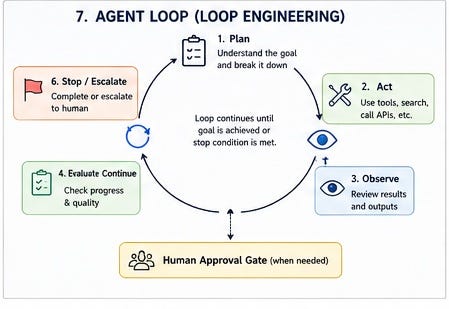
11. Loop Engineering: Loop engineering is a way of designing AI agent workflows. Instead of manually prompting an agent again and again, you design a loop: give the agent a goal, let it work, check the result, send feedback if it fails, and repeat until done or a stop condition is reached.
loop engineering does not mean “no humans needed.” It means humans design the boundaries, checks, and approval points so agents can operate more reliably.
12. Eval: An eval is a repeatable test used to measure the quality of an AI system. Evals answer questions like: is the model giving accurate answers? Is it following instructions? Is it hallucinating? Is the new version better or worse than the old one?
I still see people confuse evals and guardrails. Evals measure behaviour. Guardrails constrain behaviour.
13. Guardrails: Guardrails are rules or checks that prevent an AI system from doing something it should not. They can block harmful outputs, enforce topic boundaries, filter personal data, limit tool access, or reject responses that violate policy.
Guardrails run before or after generation . They are not part of the model itself. They are part of the system around the model.
14. Tracing: Tracing is how engineers understand what happened inside an AI workflow. A trace shows the user input, model calls, tool calls, retrieved documents, intermediate steps, errors, latency, and cost.
Tracing is especially important for agents because the final answer does not tell the full story. If an agent makes a bad decision, tracing helps you debug where the workflow went wrong.
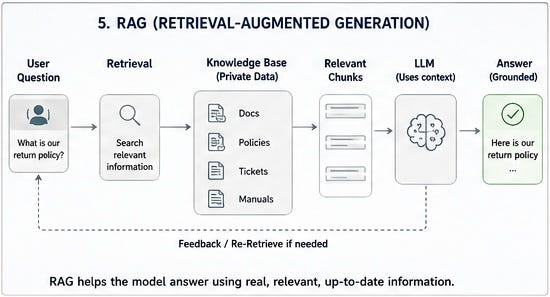
15. RAG (Retrieval-Augmented Generation): RAG is a pattern where an AI system retrieves relevant information from a knowledge source and passes it to the model as context before generating an answer. The retrieval step usually involves embedding your documents into vectors and searching them based on similarity to the user’s question.
RAG is commonly used when you want an AI system to answer questions from company documents, product manuals, policies, or other private knowledge bases.
RAG does not automatically means your data is safe or private. Privacy depends on your architecture, model provider, permissions, logging, and data-handling controls.
16. Embeddings: An embedding is a numerical representation of text (or images, or code) that captures meaning. Similar content gets similar numbers. This is what makes semantic search possible, you can find documents that are relevant to a question even if they do not share exact keywords.
Embeddings are the engine behind RAG. You embed your documents, store them in a vector database, and when a user asks a question, you embed the question and find the closest matches.
- Orchestration: Orchestration is the coordination layer of an AI system. It decides how different parts work together: models, prompts, tools, memory, RAG, agents, evals, guardrails, and human approvals.
For example, an AI support workflow may need to: understand the request, retrieve policy documents, check the customer’s account, decide whether to answer or escalate, generate a response, run safety checks, and log everything.
That full coordination is orchestration. The model generates. The tools act. The orchestrator decides what happens next.
- Skills: A skill is a reusable capability that an AI system can perform, summarise a document, search internal knowledge, create a Jira ticket, classify customer feedback, extract invoice details. Skills matter because they make AI systems modular. Instead of one massive prompt, you design specific skills for specific tasks.
The distinction: a tool is something the AI can use. A skill is something the AI knows how to do, combining instructions, tools, and process.
- **MCP (**Model Context Protocol): MCP is an open protocol that helps AI applications connect to external tools, data sources, and systems in a consistent way. Without MCP, every AI application needs custom integrations for every tool. With MCP, developers expose tools and data in a standardised format that AI systems can understand.
A simple analogy: MCP is like a USB-C port for AI applications. It gives AI systems a standard way to plug into tools and data.
MCP originated from Anthropic and is gaining adoption, but it is not yet a universal industry standard.
eg, an AI coding assistant could use MCP to connect to GitHub, documentation, a database, logs, or a project management system.
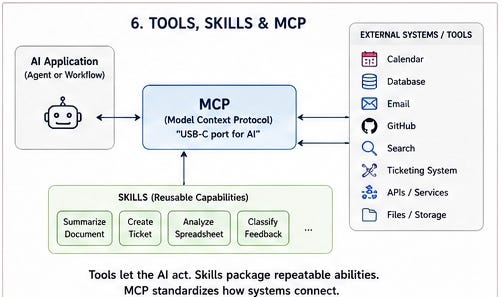
MCP is especially important for agentic AI because agents need reliable access to tools and context.
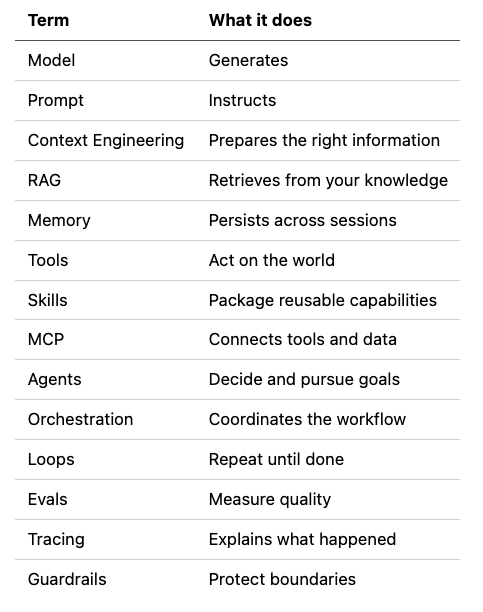
Mental model to remember all these
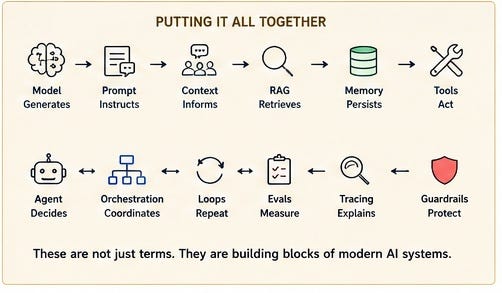
Learning AI terminology is useful, but memorizing terms is not enough. The real skill is understanding how these pieces fit together:
Thank you for reading this. If you like this, then please share in your network . You can contact me at X or LinkedIn
Happy Learning!!